VisuallyMeta
← Work

Case study

Contact Center Dialer

shipped

Agent dialler and real-time supervisor console for high-volume calling teams

Role
Product Designer
Outcome
15 Million in April'26 , 32 New Clients, Quarter Old Organisation , CX Heads – Contributing and showing trust in the company!! One Mission is Redefining Enterprise Customer Engagement.
When
5 Jan 2026 — 26 Mar 2026
Contact Center Dialer

Designing for the eight-hour shift

Role: Head of Design · Scope: User flows, IA, agent interface, supervisor dashboard redesign, QA review workflow

Context

In collections and sales, agents spend their whole shift inside the dialler, often making hundreds of calls a day. An extra click, an unclear state or a missing button repeats on every call. Supervisors have the opposite problem: they watch dozens of agents at once and need to spot problems before the numbers show them.

A dialler isn't a screen people visit. It's where they work all day, so friction adds up with every call.

Two users, two speeds

The agent

  • Focus: one call at a time
  • Needs: speed, context, no surprises
  • Failure mode: seconds lost on every call

The supervisor

  • Focus: the whole floor at once
  • Needs: live signals, early warnings
  • Failure mode: problems found too late

Part 1 — The agent dialler

Each dial mode changes how much control the agent has, so I designed a separate call view for each:

  • Manual: the agent chooses who to call and when.
  • Preview: the system queues the contact and the agent reviews context before dialling.
  • Progressive: the system dials automatically once the agent is free, so the view prioritises context over control.
  • Predictive: the system dials several contacts ahead, predicting when agents will be free, and routes only answered calls. The agent doesn't see the call until it connects, so the view has to show the customer's context immediately.

Moving from Manual to Predictive, the agent gives up control at every step. The interface has to make up for it with context.

Part 2 — The Admin/Supervisor console (V2)

How I worked: data-first design

Before anything reached a wireframe, I tagged every element in the dashboard by its data source:

  • S — Slot exists: the data is already captured.
  • D — Derivable: it can be calculated from existing data.
  • N — New feed needed: it requires new instrumentation.

If the system doesn't capture it, the UI shouldn't pretend it does.

This made the conversation with engineering concrete: each N-tagged item was a clear decision to build the feed, defer it or cut it.

Also designed

  • A QA audit review workflow that connects the dialler to quality management.
Project log

  1. The Lateral Thinking

    The best idea in the Claritel project came from outside SaaS entirely. We studied Formula 1 pit stops — where a two-second delay is a disaster — and gaming interfaces, where controller shortcuts eliminate friction for power users. That thinking shaped how agents navigate the dialer. The goal wasn't just usability. It was flow state. The product should work with the agent, not make them work for it.

  2. How can I miss this scenario?

    The customer found the bug in my design before I did. In production. In front of everyone.

    Let me back up.

    My first time designing for a dialer, I thought I'd covered everything. I mapped every log state I could think of — a call comes in as inbound, goes out as outbound, gets missed by the agent, gets missed by the customer. Right? That's everything.

    Then I went deeper. Call not connected. On mute. On hold. Completed. I designed for each one and felt pretty good about it.

    Then we shipped.

    And a customer asked, "Where's transfer and conference?"

    Damn. How do you forget transfer and conference on a dialer? And when something like that slips through, the designer wears it. I do think it was my mistake — a designer's whole job is to imagine every path a user might take and design for it.

    So, we spent two more days rebuilding: the transfer and conference widgets, and then how a transferred call should even show up in reports and data — because a new state doesn't just live on the screen, it ripples through everything downstream.

    Here's the lesson I walked away with. Can you think of every scenario up front? No. You can't. Nobody can. But you can build the flow so that any new scenario slots in without breaking the ones already there.

    Design for the paths you can see. Architect for the ones you can't.

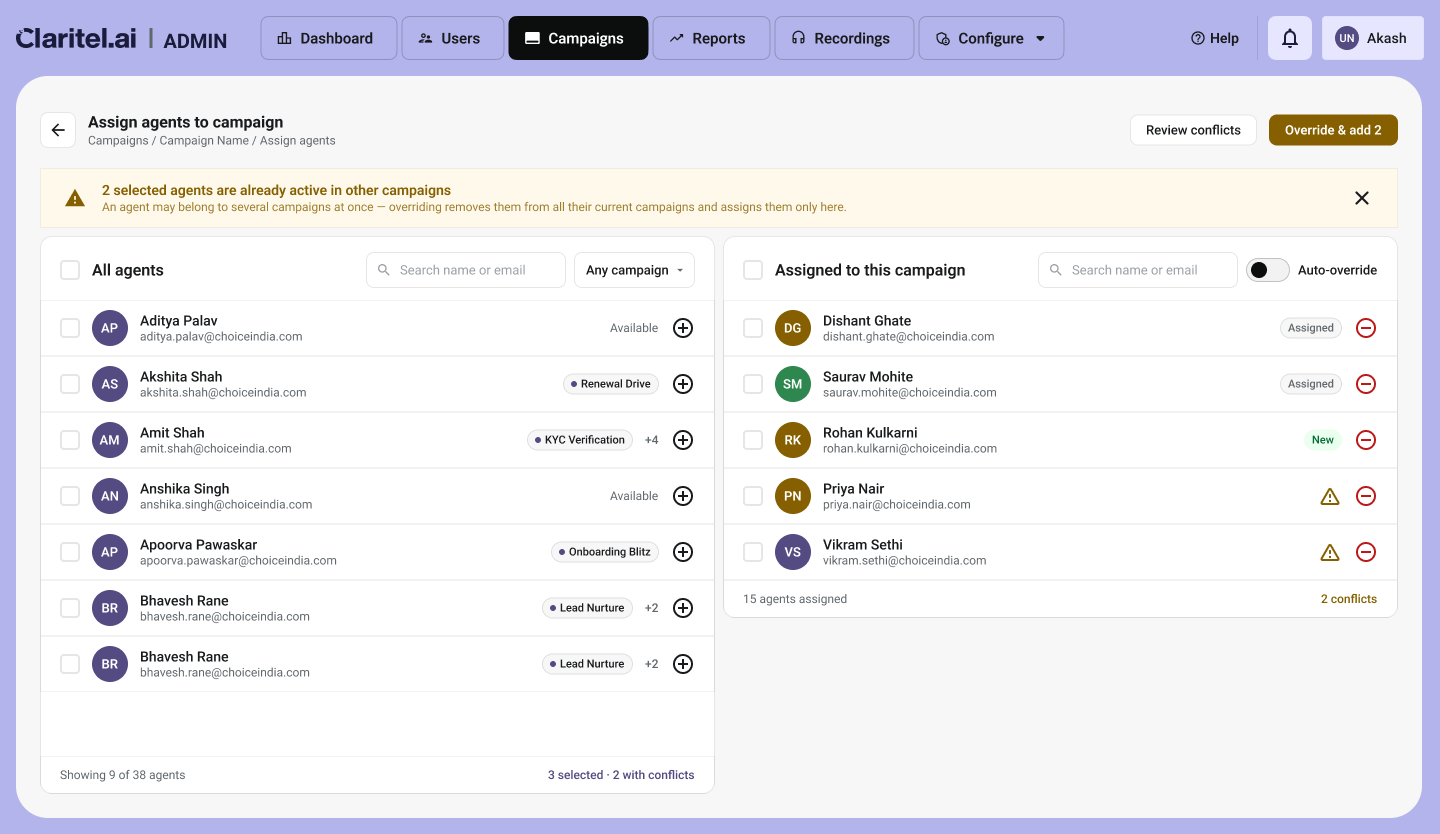
  3. Conflict arises when agent is already in a campaign

    Problem: Assigning Agents to Campaigns

    Initial approach\ When the client started using the dialer, I designed agent assignment around a single assumption: a user creating a campaign simply wants to select which agents are on it. The implementation reflected that — the full list of… more

  4. Redesigned our real-time contact center dashboard.

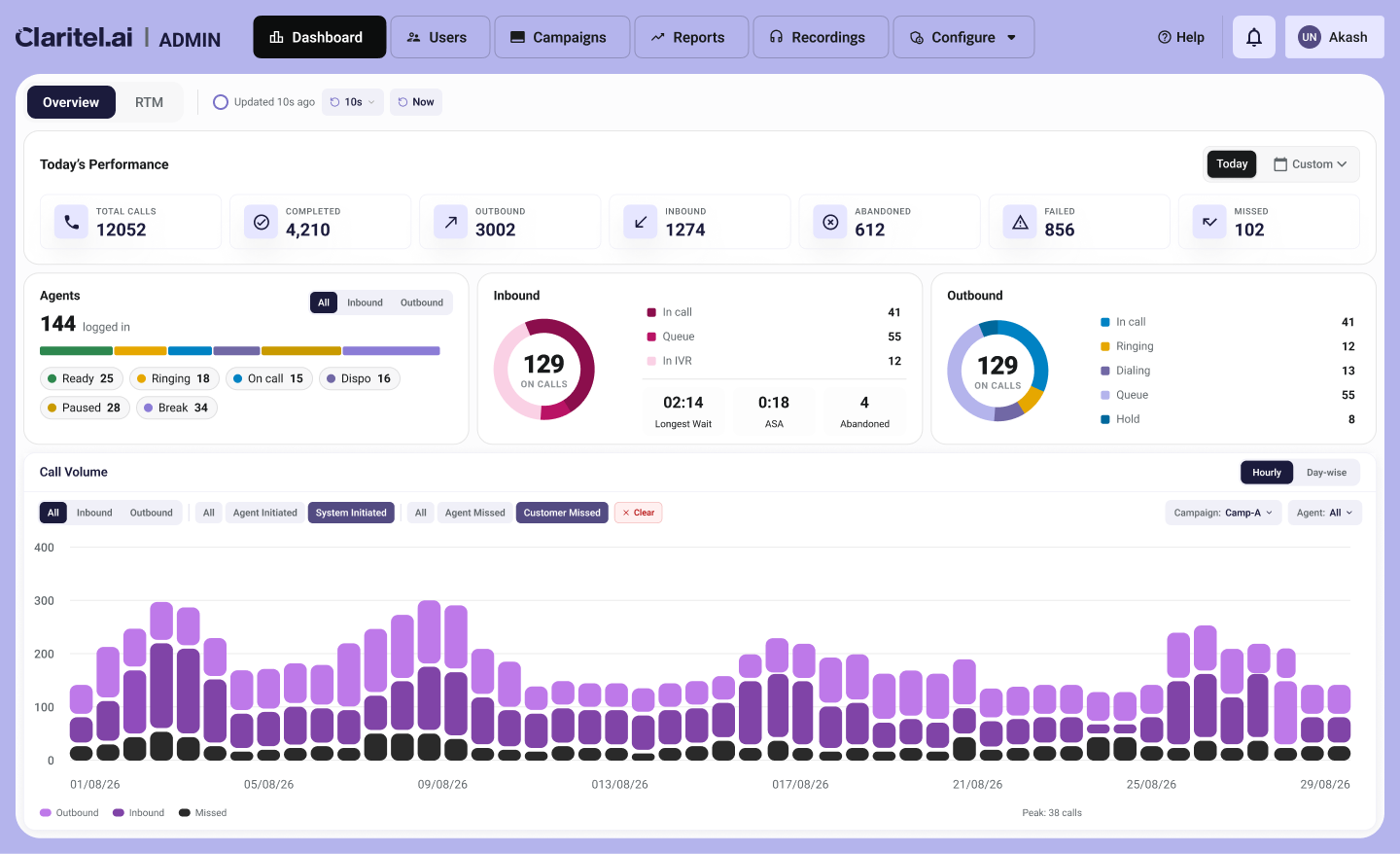
    1. Spent this week redesigning the real-time dashboard for our contact center product. thought it'd be a UI job. it wasn't. the actual problem was that the customer and the engineer wanted opposite things and both of them were right, which is the worst kind of problem to have.
    1. The customer is BFSI, outbound-heavy, and every demo they'd add one more thing to the list. how many calls are live right now. how many done today. abandon rate. who's on break vs actually on a call. AHT, talk time, hold time. dispositions. the dial mode split.

    they didn't want a metric. they wanted the whole board, live. and honestly for collections that's the right instinct — the job is knowing what's happening this second.

    1. Engineer looks at the same list and goes: this will melt the DB.

    which, fair. every number is a query, the screen refreshes roughly every 28s, so it's not a page load, it's the same query storm firing on a loop forever. he wasn't being difficult, he was right too.

    1. So now I'm stuck. give the customer everything and I've handed engineering a system that falls over. give engineering the relief and I ship a dashboard so thin it answers none of the questions the customer actually cares about.

    took me a bit to realize the mistake was treating "the dashboard" like one thing that refreshes at one speed.

    1. It doesn't have to. so I sorted every number by how fresh it actually needs to be.

    the vitals up top (total, completed, abandoned, failed) are cheap reads, those stay live. the state cards — agents / outbound / inbound — only one's open at a time, not all three polling at once. and the heavy stuff at the bottom (averages, dispositions, dial mode) is aggregation over history, so it's allowed to lag a little. nobody's making a call based on whether avg talk time updated 3 seconds ago.

    1. That bottom row is where it clicked.

    "it's slow" was never actually true. "this specific aggregation is slow" was true. and once you say it that way the fight kind of disappears — because the live stuff the customer wants most is the cheap stuff, and the genuinely expensive queries are the historical rollups, which are exactly the ones that don't need to move every 28 seconds anyway. so they don't.

    1. One thing I wouldn't budge on: if I can't tell you where a number comes from, it doesn't go on the screen.

    Call duration only shows on live calls. everywhere else it's a dash. not a fake 00:00, not a padded zero. no SLA gauge, no pause-reason card, none of the stuff every competitor dashboard has that our system doesn't actually track yet. a screen that looks full but shows nothing real is the last thing you want to hand a compliance buyer.

    1. End result is the layout in the pic. customer gets the full live board they'd been asking for. engineer gets a hard ceiling on load. nobody had to lose.

    The thing I keep thinking about is that neither of them was wrong, the disagreement was just happening at the wrong altitude. the whole fix was buried inside one word everyone kept using too loosely — "slow."

  5. The clients ignored the charts

    What happened: I showed clients the redesigned monitoring dashboard: an Overview tab full of charts, and an RTM tab with five sub-tabs (Agents, Inbound, Outbound, Campaign, OBD). The Overview tab got almost no reaction. RTM got all the questions.

    What they actually asked for:

    • Which agents are idle right now?
    • Who has been on an unusually long call?
    • Which campaigns have run out of leads?
    • Filter inbound calls by queue status.

    Supervisors didn't want to see how the day was going. They wanted to know what needed their attention right now.

    What changed:

    • A right-side drawer for each row in Agents, Inbound, Outbound and Campaigns, with live actions in it: Monitor, Whisper, Barge.
    • Advanced filters for each tab, with an estimated record count shown before the filter is applied. Supervisors can see the size of a query first, which also keeps API calls efficient.

    Workflow note: Screens were built in HTML with Claude Code first, then ported into Figma for refinement.

  6. Superadmin Revamp

    The requirement came after a partner wanted to be a middleperson and sell the dialer to their contacts. For this we need to share superadmin access to the partner. Now obviously we can't share everything with them.
    This is also a challenge, when we set up the dialer on-premise.

    I always ask my teammates to keep suggesting improvements and difficulties from time to time. I was already keeping tracks of changes required in superadmin and how it is too complex to use. But more the complexities these were the main points that made me go for revamp:

    • Security: We needed to define the roles properly within the organization to avoid any leaks, espionage, or mistakes to a tenant account that might hamper their organization.
      • Meta Data: To keep track of all the changes done to any tenant and by whom.
      • More layers of authentications like 2-factor.
        • Root Cause Analysis (RCA): If any tenant asks, about certain system related problem, instead of searching in database, we would be able to check this screen, download the complete call trace or multiple traces, and provide the RCA to the clients.
Next projectCloud Telephony →